Stop Switching Between WhatsApp and Your CRM. For many sales and support
teams, WhatsApp is where customer conversations actually happen. But CRM updates often
happen somewhere else.
That creates unnecessary switching, duplicate work and missed follow-ups.
With WhatsApp Web Connect, your team can work with the GoHighLevel contact while the
conversation is still open.
Employees leave WhatsApp, open GoHighLevel, search for the customer and return to the conversation.
Important conversation details often stay inside WhatsApp instead of being added to the CRM.
Sales representatives spend valuable time searching for contacts and updating records manually.
Groups, saved numbers and different name formats can make it difficult to identify the correct CRM contact.
Notes, tasks, opportunities and appointments can become disconnected from the conversation that triggered them.
We designed WhatsApp Web Connect around one simple idea: CRM work should not interrupt customer conversations. The extension creates a focused workflow between WhatsApp Web and GoHighLevel.
Your team continues using WhatsApp Web as they normally do.
The extension adds a G button to the WhatsApp conversation header.
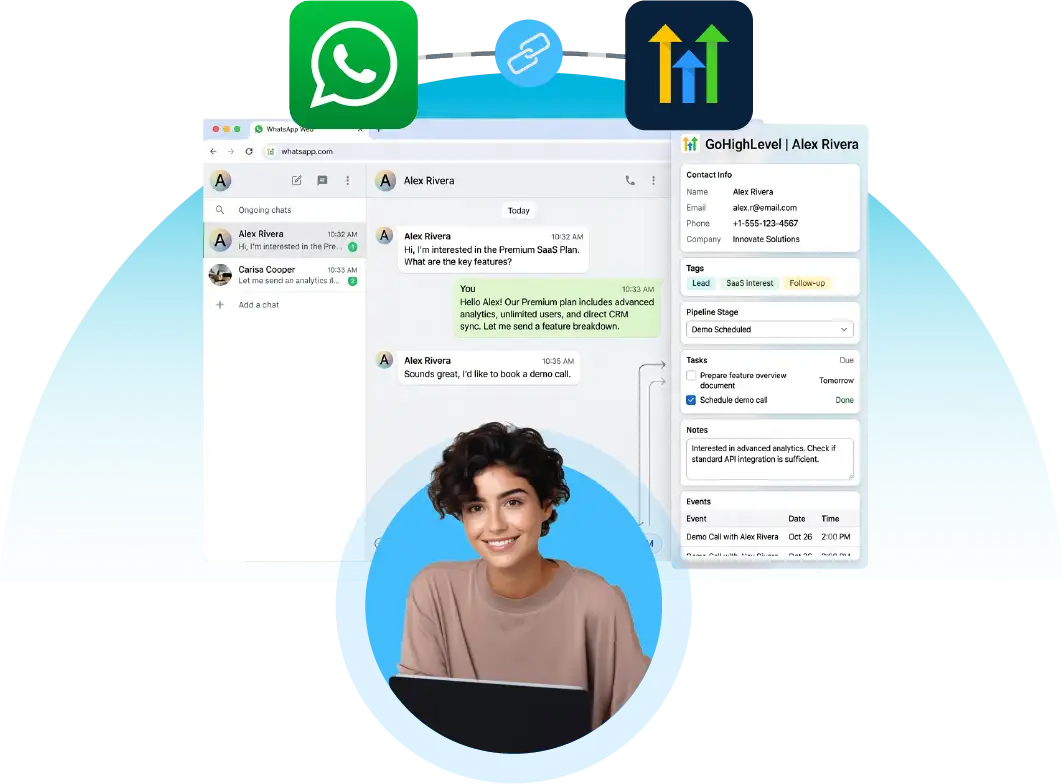
The GoHighLevel contact panel opens alongside the WhatsApp conversation.
The extension identifies GoHighLevel contacts using available details like name and phone number.
Manage contacts, notes, tasks, opportunities, appointments, and DND.
The WhatsApp conversation remains visible while CRM actions are completed.
Open the CRM side panel directly from the WhatsApp conversation header. The G button provides a quick entry point to your GoHighLevel contact workflow.
Work with the CRM without leaving the WhatsApp conversation. The side panel keeps customer information and CRM actions available beside the chat.
Team members can sign in using their extension credentials. The extension maintains the session securely and provides a logout option when required.
The extension identifies the relevant GoHighLevel contact using available WhatsApp information. It can also accommodate name variations.
If the contact does not exist in GoHighLevel, users can create the contact directly from the side panel. Supported fields include First Name, Last Name, Phone, Email, Standard & Custom fields.
Update GoHighLevel contact information without leaving the WhatsApp workflow. Users can edit available standard and custom contact fields according to permissions.
Group conversations require additional care. Instead of treating an entire group as one CRM contact, select the specific group member you want to work with.
When the phone number is not immediately visible in the conversation header, the extension uses available contact details to identify the record.
Add, edit or delete notes associated with the GoHighLevel contact. Example: “Interested in the premium plan. Follow up next Tuesday.” Retain important context effortlessly.
Create and manage CRM tasks from the WhatsApp workflow. Users can: Add tasks, Set due dates, Update tasks, Complete tasks, Delete tasks
Create and manage GoHighLevel opportunities from the side panel. Possible actions include: Create opportunity, Select pipeline, Select stage, Update status, Add value, Manage existing opportunities. GoHighLevel uses opportunities to represent potential sales and organize them through pipeline stages.
Book and manage appointments while talking to the customer. Possible actions: View relevant calendar information, Book appointment, Update appointment, Remove appointment. GoHighLevel supports appointment booking from areas such as Conversations, Contacts, Calendars and Opportunities.
Manage contact communication preferences from the CRM panel. Supported Channels: Calls, Email, SMS, WhatsApp, Other configured channels. This gives teams more control over how and when customers should be contacted.
Allow teams to work with the GoHighLevel fields that matter to their workflow. Examples: Lead Source, Customer Type, Industry, Sales Owner, Location, Custom Qualification Fields, Account Status
The extension should be positioned as a productivity layer that makes selected GoHighLevel CRM actions accessible from WhatsApp Web.
Keep the customer conversation open while working with CRM data.
Find the right contact and record the next action without jumping between applications.
Reduce repetitive searching, copying and switching between WhatsApp and GoHighLevel.
Purpose-built contact matching and group handling help reduce incorrect CRM updates.
Notes, tasks, opportunities and appointments can be managed from the same contact view.
Give sales representatives quick access to CRM information while they are actively speaking with prospects.
Important customer information can be captured while the conversation is fresh.
Give sales, support and customer-success teams a consistent way to manage WhatsApp conversations and CRM actions.
The side-panel experience keeps the CRM workflow next to WhatsApp instead of forcing users to constantly change screens.
The extension is designed around common GoHighLevel CRM activities including contacts, opportunities, tasks and appointments.
Simple Setup. Practical CRM Workflow.
WhatsApp Web Connect helps sales, support, and customer success teams manage CRM data beside customer conversations.
Teams can manage customer inquiries, follow-ups, appointments and contact information from their WhatsApp workflow.
Review buyer, seller, investor, and prospect information and organize contacts based on available profile signals.
Agencies managing multiple client conversations can keep customer information organized inside GoHighLevel.
Sales representatives can qualify prospects, update CRM records and manage opportunities without leaving WhatsApp.
Sales and support teams can manage permitted CRM information and follow-ups while communicating with prospects.
Admissions and counseling teams can manage prospective student information and follow-up activities.
Teams can organize customer inquiries, follow-ups, booking-related tasks and appointments.
Analyze customer and prospect profiles to help marketing and sales teams organize contacts.
Dealership and sales teams can organize leads, opportunities, follow-ups and appointments.
Teams can manage customer information, service inquiries, tasks and appointments directly from the WhatsApp workflow.
The product focuses on the actions teams actually perform while talking to customers.
We understand that AI becomes valuable when it solves a real business problem not simply because AI is added to a product.
Your CRM information stays beside the WhatsApp conversation.
The extension is designed to handle different contact-name formats and WhatsApp contact scenarios.
Contacts, notes, tasks, opportunities, appointments and DND are available through one workflow.
Reduce repetitive CRM navigation and help teams capture information while conversations are happening.
Build the extension around APIs and modular services so new GoHighLevel capabilities can be added over time.
Use appropriate authentication, access control, secure sessions and minimum required permissions.
The workflow should be simple: Open Chat → Click G → Find Contact → Take Action
Get clear, comprehensive answers about how WhatsApp Web Connect provides a seamless GoHighLevel CRM side panel directly alongside your WhatsApp Web conversations.
Learn how contact matching, real-time field editing, notes, tasks, pipeline opportunities, appointment booking, and group member management streamline your workflow.
Can't find the answers you're looking for? Reach out to our specialist support team anytime.
Contact Support →WhatsApp Web Connect is a browser extension that provides a GoHighLevel CRM side panel alongside supported WhatsApp Web conversations.
No. GoHighLevel remains the CRM. The extension provides a convenient interface for selected CRM actions while users work in WhatsApp Web.

Yes, the extension is designed to match available WhatsApp contact information with GoHighLevel contacts.
Yes. When a matching contact is not found, users can create a new GoHighLevel contact from the extension panel.
Yes, supported standard and custom contact fields can be edited from the side panel.
Yes. Users can add, edit and delete notes associated with the GoHighLevel contact, subject to the permissions and API capabilities configured for the integration.
Yes. Users can create and manage GoHighLevel tasks from the side panel.
Yes. The extension can provide supported opportunity actions such as creating or managing pipeline opportunities. GoHighLevel organizes opportunities through pipelines and stages.
The product can provide appointment actions through the GoHighLevel integration, subject to the connected account's permissions and supported API functionality.
The product is designed to help users identify the individual group member they want to work with instead of treating the entire group as one CRM contact.