Most CRMs are excellent at telling you who your customers are. But they don't always make it easy to understand where your business is growing, where you're losing opportunities and where you have room to expand. GeoIQ adds a geographic layer to your CRM data.
Thousands of contacts can become rows in a CRM. A map can reveal patterns that aren't obvious in a list.
Which cities generate the most customers? Which states generate the most revenue? Which postal codes have the highest conversion? GeoIQ makes those patterns visible.
Your sales pipeline may be heavily concentrated in a few locations. GeoIQ helps your team identify those geographic concentrations.
Some areas may have high leads + strong pipeline + low customer count. That could indicate a high-potential market worth investigating.
Sales and marketing teams often need to manually combine CRM information with geographic research. GeoIQ brings geographic analysis closer to the CRM workflow.
GeoIQ follows a simple process to transform standard CRM data into actionable geographic strategy.
Install GeoIQ on your agency or GoHighLevel environment.
Open GeoIQ directly from your GoHighLevel location.
GeoIQ reads relevant CRM contacts and opportunities and places them geographically.
Switch between geographic views: Contacts → Revenue → Opportunities → Conversion → Untapped.
Use geographic patterns to understand where your business is strong and where potential exists.
Save areas, explore contacts, export results, manage tags and return to your CRM workflow.
Turn CRM data into geographic intelligence with specialized map views, area scoring, and prospect discovery.
See Your Business From a Geographic View. Start with a high-level
dashboard showing the geographic health of your business.
Metrics: Contacts,
Leads, Customers, Pipeline, Revenue, Conversion, Geographic Health, Top Areas &
Recommended Areas to Explore.
See Where Your Contacts Are. Visualize contacts geographically instead of viewing them only as CRM records. Find contact concentrations, identify customer clusters, understand reach, explore specific areas, and open relevant contacts.
See Where Your Revenue Comes From. Turn revenue data into geographic insight. Identify high-revenue areas, revenue concentrations, geographic revenue gaps, and markets worth deeper analysis.
See Where Your Pipeline Is Growing. Visualize opportunities by geographic area. Identify high-pipeline markets, opportunity clusters, emerging territories, and areas requiring follow-up.
Find Areas That Turn Leads Into Customers. Compare lead and customer activity geographically. Discover why Area A (1,200 Leads, 310 Customers, 25.8% Conversion) outperforms Area B (900 Leads, 90 Customers, 10% Conversion).
Find Areas You Could Be Missing. GeoIQ compares public map information with CRM contacts to identify businesses that may not yet be in your CRM. Clearly visualizes: Already in CRM vs. Potential Prospects.
Score Every Area From 0–100. GeoIQ provides an objective geographic score that helps sales and marketing teams compare locations, evaluate density, and determine market viability.
Save the Places That Matter. Save custom areas based on City, State, Country, Postal Code, Radius, or Custom polygon shapes. Direct actions: Save → Compare → Export → Open Contacts → Add Tags → Remove Tags.
Discover Businesses Beyond Your CRM. Use public map data to discover businesses near your selected territory. Instantly distinguishes between "Already in CRM" contacts and new "Potential Prospects".
Know Where to Act Next. GeoIQ doesn't stop at displaying pins. Highlights patterns worth investigating with practical Suggested Actions rather than generic estimates.
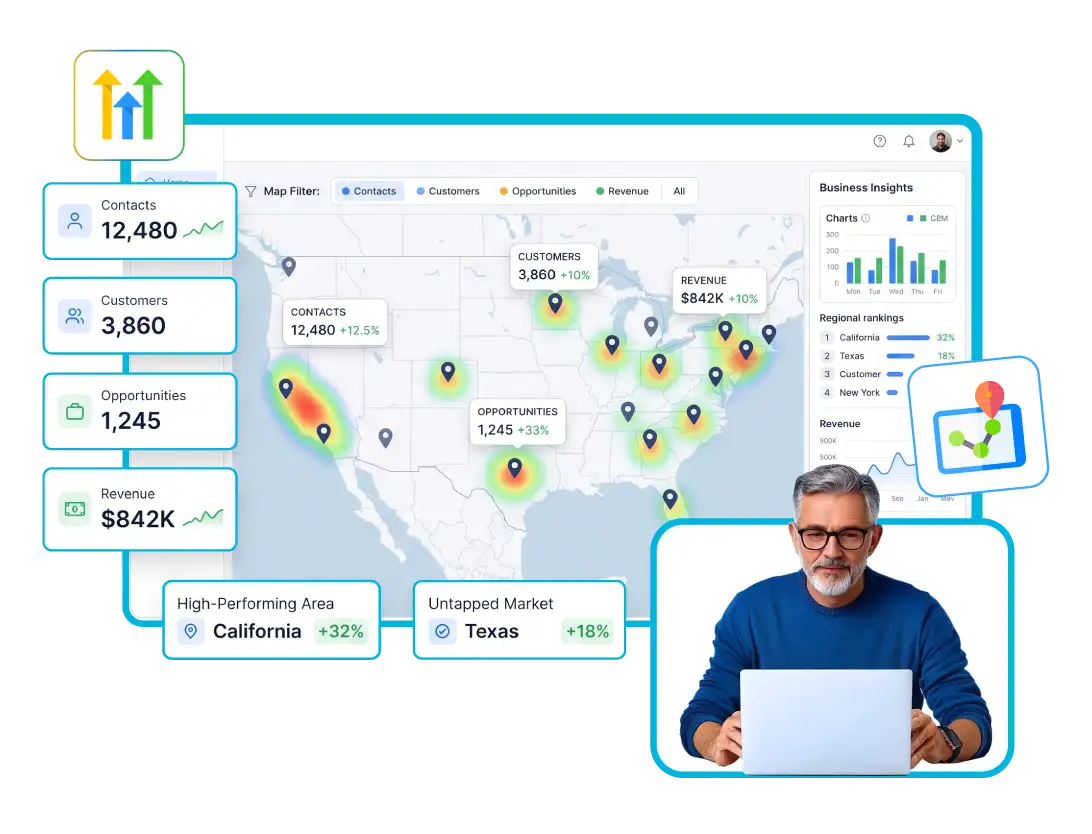
Miami has a strong concentration of leads and pipeline, but customer penetration is comparatively low.
See exactly where your contacts, customers and opportunities are concentrated.
Identify geographic areas contributing to revenue.
Use geographic patterns when planning sales and marketing territories.
Find areas where your CRM presence may not reflect the broader market.
Identify areas where lead-to-customer conversion differs.
Bring CRM data and geographic analysis together.
Maps can reveal geographic patterns that are difficult to identify in spreadsheets.
Data → Map → Insight → Action
Stop scrolling through endless database lists. Discover what geographic intelligence can unlock for your agency and sales team.
Engineered specifically for GoHighLevel with high-performance spatial processing, interactive mapping, and real-time CRM synchronization.
From installation to geographic action in six straightforward steps.
Tailored geographic intelligence for agencies, service businesses, real estate, healthcare, and enterprise sales teams.
Analyze client markets, identify geographic lead concentrations, discover potential prospects, build location-based campaigns, and compare territories.
Map buyers, sellers, investors, leads, opportunities, and properties.
Map customer and prospect locations to understand sales territories, service markets, customer density, and dealership expansion opportunities.
Visualize geographic distribution of leads, customers, locations, and opportunities.
Ideal for businesses such as: HVAC, Plumbing, Roofing, Electrical, Landscaping, and Cleaning.
Map student inquiries, leads, enrollments, and campaign. Understand where prospective students are coming from.
Identify geographic concentrations of prospects, customers, opportunities, and Revenue.
Use geographic intelligence for territory planning, sales coverage, prospecting, account management, and regional performance.
GeoIQ is designed around the GoHighLevel CRM environment.
Switch seamlessly between Contacts → Revenue → Opportunities → Conversion → Untapped.
GeoIQ works with your CRM data rather than forcing your team into a separate spreadsheet-based process.
A geographic map can reveal concentrations, gaps and patterns that are difficult to spot in a traditional CRM table.
Compare your CRM footprint with available public map information to explore potential prospects outside your current database.
Don't just show geographic data. Help users understandWhere should I look?, what is happening there?, and What should I investigate next?
Analyze the geography that matters to your business: City | State | Country | Postal Code | Radius | Custom Shape.
Get clear, comprehensive answers about how GeoIQ works with GoHighLevel to turn CRM data, contacts, and opportunities into interactive business maps.
Discover how spatial analysis, untapped market search, area saving, and revenue visualization empower your sales and marketing teams.
Can't find the answers you're looking for? Reach out to our specialist support team anytime.
Contact Support →GeoIQ is a geographic CRM tool that turns GoHighLevel contact and opportunity data into an interactive business map.
You can switch between different views including contacts, revenue, opportunities, conversion, untapped markets and Geo Score.
Yes. GeoIQ is designed to place relevant CRM contacts geographically so teams can understand where their contacts and customers are located.
Yes. The Revenue view is designed to help users understand where revenue is coming from geographically.
Yes. The Opportunities view helps visualize where your pipeline is geographically concentrated.
The Untapped view helps identify areas where there may be potential market demand but comparatively fewer customers represented in your CRM.
The Market feature can use available public map data to identify businesses in a selected area and distinguish businesses already represented in your CRM from potential prospects outside it.
You can work with cities, states, countries, postal codes, radius-based areas and custom shapes.
Yes. Users can save relevant areas for further analysis and comparison.
The product supports area export according to your supplied product functionality.